
Views & Panels
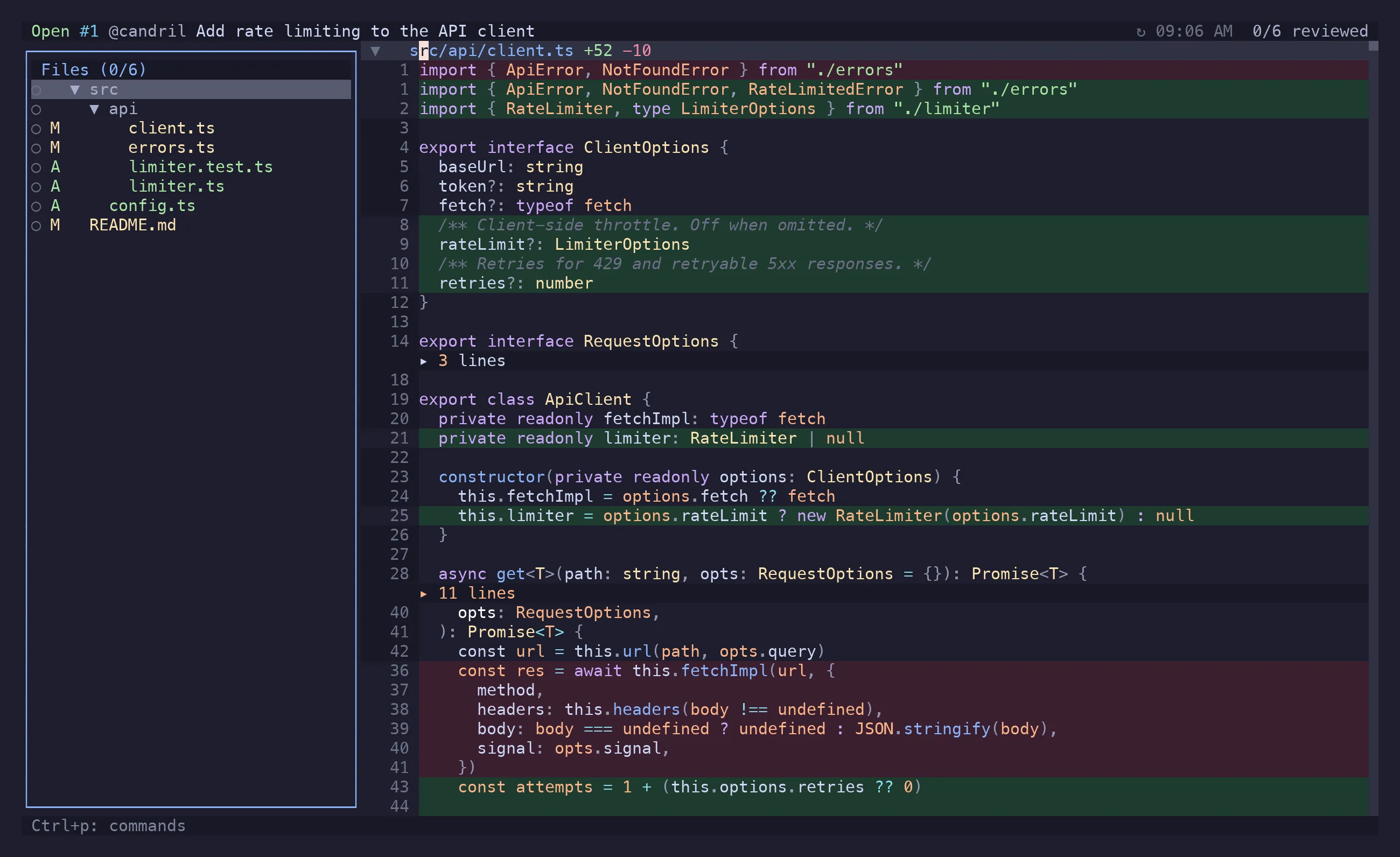
riff is one screen with panels that come and go. The diff is always the middle; the file tree docks left, the comments panel right, and the PR overview replaces the diff entirely.
riff · #412 Add rate limiting 3 files · 2 threads ← header┌──────────────────┬──────────────────────────────┬────────────────────────┐│ file tree │ diff │ comments ││ Ctrl+b │ │ Ctrl+t │└──────────────────┴──────────────────────────────┴────────────────────────┘ ]c hunk ]f file v viewed c comment Ctrl+p actions ← status barCtrl+h and Ctrl+l move focus across that row. Ctrl+e blows the focused side panel up to
full width when a path is too long or a thread too deep to read in a column.
The diff
Section titled “The diff”Syntax-highlighted through Tree-sitter, with a cursor that sits on an actual line — which is what
makes c able to anchor a comment, and y able to yank without the +/- gutter.
Two shapes:
- All files, one after another, with foldable file headers. This is the default, and picking a file in the tree or the picker scrolls to it here rather than leaving it.
- Single file, for reviewing one file with nothing else on screen. Open File Alone in the
action menu narrows to the file at the cursor;
Escgoes back.
Threads that exist on a line show as a marker in the gutter and a preview under it, so you can
read a conversation without opening anything. Enter opens the thread properly.
Unchanged lines that the diff elided sit behind a divider. Enter on the divider expands them,
for reading. They are not commentable: GitHub cannot anchor a review comment to a line outside
every hunk, so riff refuses up front rather
than after you’ve written it.
Scrolling with the mouse takes the cursor with it, the way vim keeps the cursor in the window —
so the tree, c and the comment anchors keep agreeing on where you are.
Markdown tables
Section titled “Markdown tables”A table in a .md file is padded onto one grid before it is drawn, so the columns line up even
when the source doesn’t — and a - row sits cell-for-cell above the + row that replaced it,
which is what makes a one-cell change visible at all.
gl on a table row draws the whole table as a real grid instead of the row’s source: cells wrap,
a row grows to its tallest cell, and <li> becomes a bullet on its own line. That is where you
check a table reads right — the diff beside it, still showing source, is where you say so. A
table or diagram bigger than the window is a window onto it, not a clip: hjkl and the arrows
scroll, Ctrl+d/Ctrl+u by half a page, and the header says which rows and columns you are on.
The alignment is display only. The file is untouched, y yanks what the file says, and nothing
about the line count changes, so comments still anchor where you put them. Tables inside a fenced
code block are left alone. alignMarkdownTables = false under [diff] turns it off, and so does soft
wrap — padding a table only helps while its columns are still columns.
Long lines
Section titled “Long lines”The diff does not wrap by default: a wrapped line takes several rows, and one row per line is the
shape you scan a diff for. Long lines scroll sideways instead, and the cursor drags the view with
it — $, w or a search match past the right edge brings its column into view, with a few
columns of lookahead, the way sidescrolloff does in vim.
zl and zh scroll one column, zL and zH half a screen, and zs/ze put the cursor’s
column against the left or right edge. The line numbers and comment markers stay pinned at the
left while you scroll; only the code moves.
While the cursor sits on a line wider than the window, the status bar reads col 84/312 — where
you are, and how much line is left.
A line that continues past the right edge ends in a dim ›, and one with content scrolled off to
the left gets a ‹ in the gutter’s padding — so a truncated line never reads as a line that
simply ends there.
zw soft-wraps the whole diff instead, if you would rather pay that cost than scroll. Wrapping
breaks on words, and a row a line continues onto is marked ↳ in the gutter, so a wrapped line
never reads as a new one. Everything
else keeps working, the cursor and comment anchors included. Set wrap = true under [diff] in
the config file to start that way.
When a line is long enough that scrolling through it is more work than reading it is worth, gl
shows it whole in an overlay, still syntax-highlighted — the alignment the diff has
to keep doesn’t matter there. Esc closes it. For the truly pathological ones, gf opens the file in $EDITOR, and
generated files belong in ignore patterns rather than in
a review.
There is no horizontal scrollbar. One long line anywhere makes the content wider than the viewport, and the bar would then sit across the bottom of the diff for the rest of the review.
za on a fenced code block folds it to its opening fence — ```mermaid ▸ 23 lines —
so the prose around a forty-line diagram is readable; za again opens it, zA does every block
in the file at once, and zR/zM take blocks with them. A block only folds when both its fences
are on screen: a fence whose partner is outside the hunk is text, not a block.
Enter on a collapsed run of context — ▸ 18 lines ↵ — fetches those lines and shows them. It
is one-way, and deliberately not a fold key: a fold hides what you can see, this brings in what
the diff never carried. The run after the last hunk reads rest of the file until riff has the
file to measure, and then either carries a count or goes away, because the last hunk reached the
end after all.
za toggles what’s under the cursor: a file header folds the whole file away, a hunk header
folds the hunk. zR and zM do the whole diff at once. Marking a file viewed folds it, so the
diff shortens as you work through it.
Flash jump
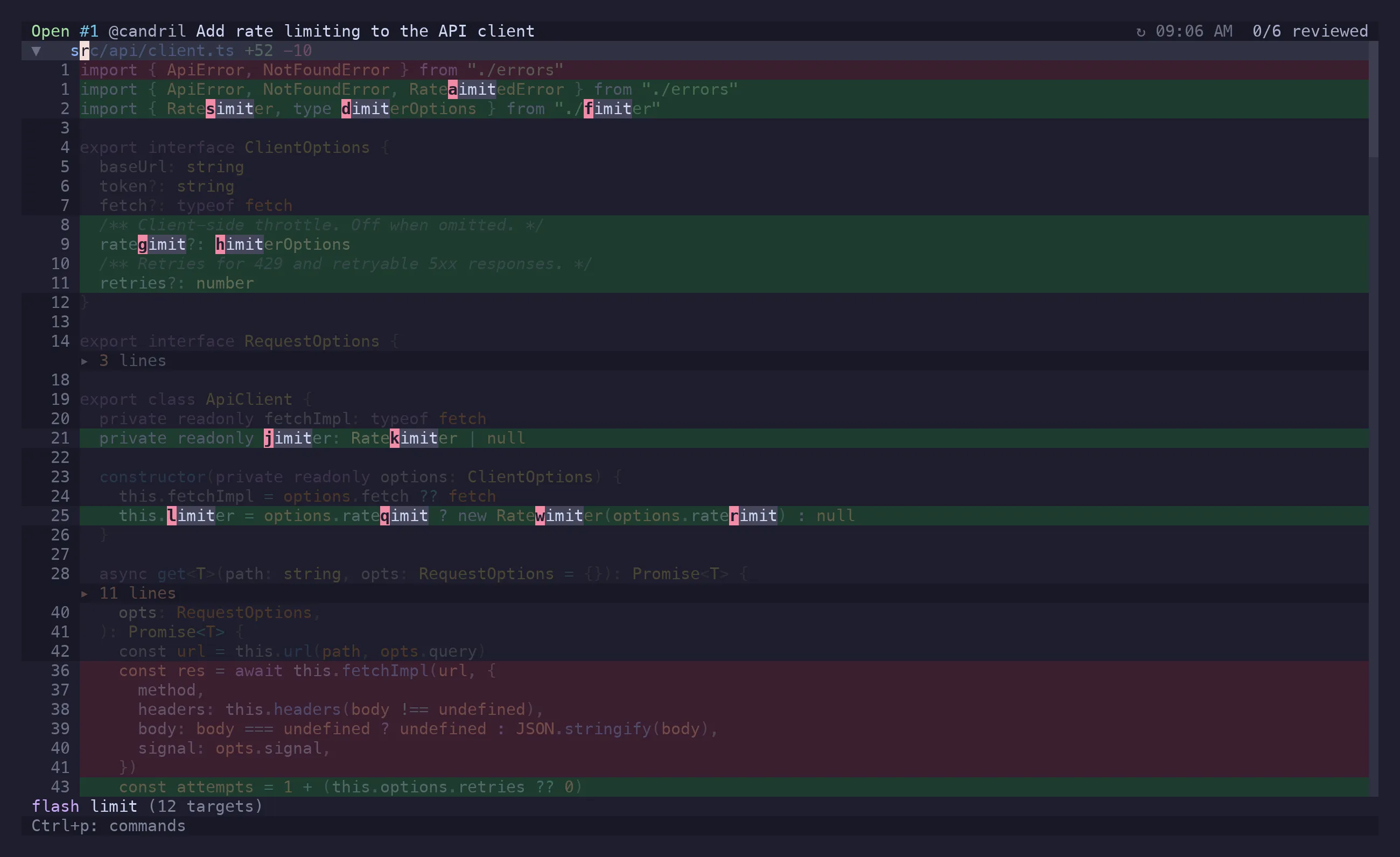
Section titled “Flash jump”s dims the diff and starts a literal, case-insensitive search over what is currently on screen.
Every match gets a single home-row label drawn on the cell the cursor would land on; press it and
you’re there. Backspace un-types, Esc or Enter leaves without moving.
In the all-files view the file headers are targets too, and a header’s text is its full path — so
s then part of a path jumps to that file, without a second key to remember.
It’s the fast path when the target is already visible — you type the characters and the label in
one motion instead of /pattern<CR>nnn. For anything off screen, use /.
s works in the lists too — the file tree, the PR overview’s sections and rows, the feed, the
comments panel. There it labels every visible row at once and the next keystroke jumps: there
are rarely forty rows on screen, so a label each is enough and it costs one keypress. Any key
that is not a label cancels, and the keys the list would act on (v/x in the tree, x/c in
the overview, r/e/d/x in the comments panel) are kept out of the alphabet, so a mistyped
jump never marks a file viewed or deletes a comment.
Syntax highlighting
Section titled “Syntax highlighting”The rows on screen are fragments — folds take text out, and both sides of a change sit next to each other — so parsing them as if they were the file gets a hunk that starts inside a block comment wrong: it reads as code. riff parses the file instead and moves its colours onto the rows that show its lines, reading the file once when the cursor arrives in it, off disk locally and through the same fetch that expands context in a PR. Until the parse lands, and where riff cannot have the text at all, the rows keep the colours they had.
Deletions are the exception: a deleted line comes from a version that no longer exists, and is highlighted from what is on screen.
Search
Section titled “Search”/ and ? search the rendered diff in either direction, n/N repeat, */# take the word
under the cursor. Matches stay highlighted until Esc.
File tree
Section titled “File tree”Ctrl+b. Directories collapse, and each file carries its status: added, modified, deleted,
viewed, has comments, ignored. v marks viewed from here too, and Ctrl+e expands the tree to
full width when the paths are long.
Files matched by your ignore patterns are hidden — lock files, generated code, snapshots. Toggle Hidden Files in the action menu brings them back when you actually do need to look at the lockfile.
/ with the tree focused filters it by path: the header turns into a text field, the tree narrows
as you type (loosely, against the whole path), Enter keeps the filter, Esc drops it, and
Backspace in the tree clears it. Editing keys behave as they do in any input
(Ctrl+w deletes a word). Matching directories come back expanded, so nothing hides in a fold,
and your own expansion state returns with the filter cleared.
The all-files diff narrows with the tree — while a filter is on it lists exactly the files the
sidebar does, so / is how you read a subset of a large PR end to end.
Enter on a file scrolls the diff to it and leaves the rest of the diff in place: picking a file
is navigation, not a decision to review it alone. The highlight runs the other way too — moving
through the diff moves the tree’s highlight to the file you are in, and scrolls the tree to show
it. A file inside a collapsed folder is left alone rather than unfolded.
Ctrl+f is the fuzzy picker over the same list — the filter when you want the tree to stay, the
picker when you just want the file.
Viewed state
Section titled “Viewed state”v marks the file viewed, collapses it, and moves you to the next unviewed one; ]u/[u
navigate by it directly. riff records the commit you viewed it at, so a file that changes after
you signed it off shows as outdated — ]o/[o walks exactly those. In PR mode this is
GitHub’s own viewed checkbox, read at startup and written back, so it agrees with the web UI.
Comments panel
Section titled “Comments panel”Ctrl+t, Enter on a line that has a thread, or c to write one. It shows the threads for the
current file — or the one you opened — as a conversation:
author, age, resolution state, replies, reactions.
Opened from the PR overview or the feed, the panel appears beside them and they stay put — you
asked to read what was said, not to leave. Moving to a comment with j/k is the moment you
asked to see the code, so the diff comes back then, scrolled to that comment’s line; Ctrl+o
returns to the overview.
/ narrows the panel to the threads whose author, text or file match. Threads collapse to their
root comment when resolved, and za opens them back up — though arriving at one from somewhere
else opens it for you: the feed, the comments picker, ]r, or Enter on a commented line all
mean “show me this comment”, so a resolved thread is not left folded over the answer. An outdated
thread — one anchored to a line the branch has since moved past — expands to show the hunk it was
originally written against, so the comment still makes sense.
Composing happens in the same panel: n for a new comment, r to reply, e to edit. Ctrl+g
escalates a draft to $EDITOR mid-sentence and drops the result back in. In a local review the
footer stops offering to publish — Ctrl+p there just saves.
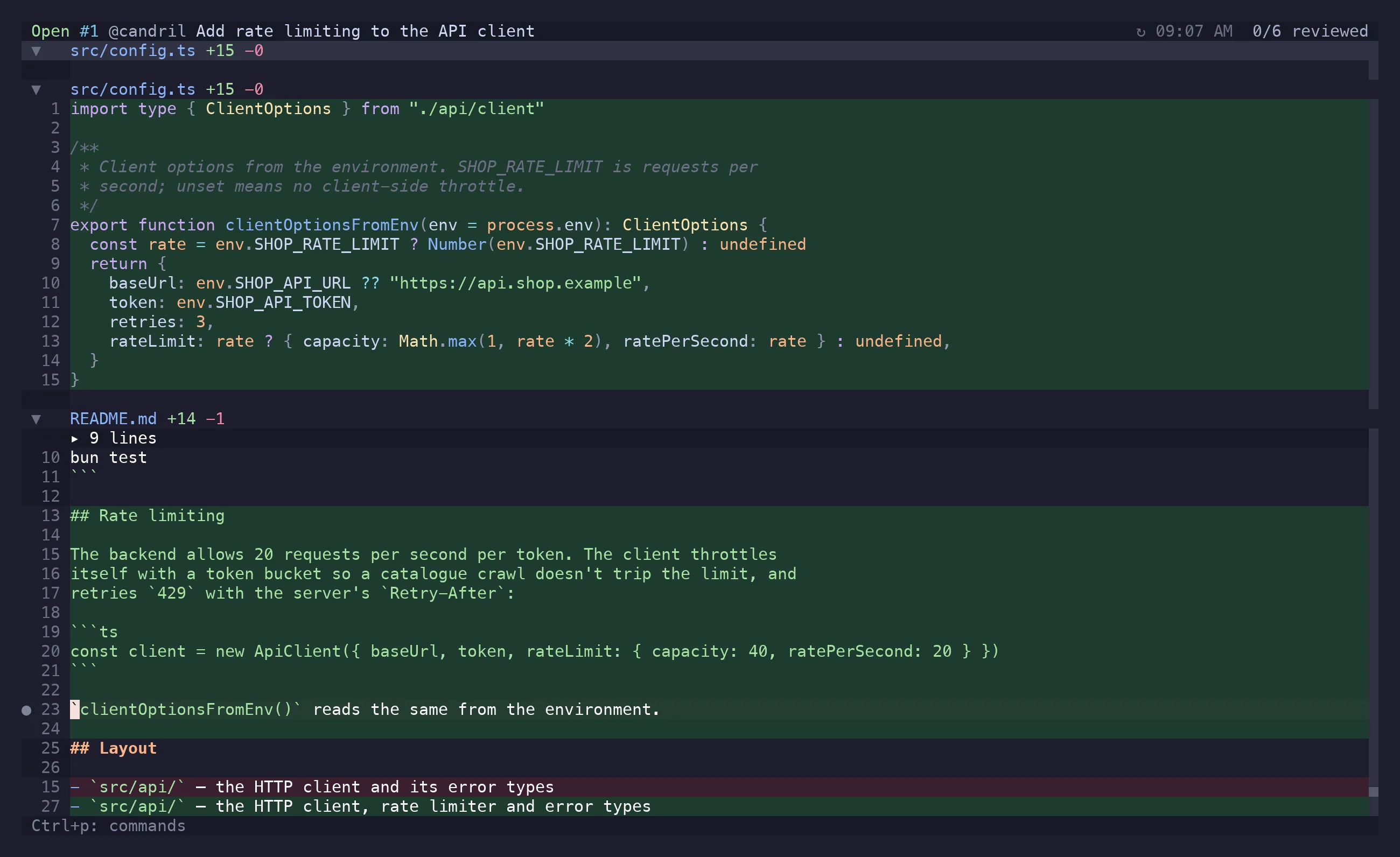
Picking a file with Ctrl+f, or a comment with gC, takes you to the diff — from the overview
and the feed as much as from the diff itself. A file is a thing you read, and reading happens
there.
Three views, one key apart
Section titled “Three views, one key apart”A pull request is read as three surfaces, and each keeps its own place:
| Key | View | What it answers |
|---|---|---|
i |
PR state | What is true about this PR now |
a |
Feed | What happened to it |
d |
Diff | What changed |
Any of the three keys works from any of them, and pressing the key of the view you are already in takes you back to the one you came from. Leaving a view keeps its position: the diff its cursor and scroll, the PR state its section and row. Local mode has only the diff — there is no pull request to have a state or a feed.
PR overview
Section titled “PR overview”i toggles it, gi goes straight there. It replaces the diff with the PR itself. One metadata
row — who wrote it and which branch it is — and then the sections, each collapsed with its count
and a one-glance summary, bar the description, which is open:
- Description — the body, rendered.
- Previews — where a deploy bot put this PR, one row per app:
Enteropens,ycopies,Ycopies every URL on the row, and a row with several links asks which.gxlists every app’s links at once, the build’s own run included. Configured in[previews]. - Conversation — PR comments and review threads, expandable with
l, resolvable withx, andcwrites a new one. - Checks — status per check. A failing one expands into its annotations, and
Enteron an annotation opens that file at that line in$EDITOR. Annotations often point at files the PR never touched, which is why they open in the editor rather than in the diff. - Approvals — who reviewed and what they said.
- Commits — the ones the PR carries.
- Files — the changed list, with viewed state.
Sections fold with za, zm/zr, zM/zR. s labels the rows to jump to one, /
narrows them, and d on a file row opens the diff at that file. Reactions can be added to
whatever is focused via the action menu.
Following a link
Section titled “Following a link”In the diff, gx opens the URL under the cursor. A rendered body has no cursor to put on a
link, so in the overview and the comments panel gx lists every link in the view instead — the
description, the preview rows, the conversation, the checks, the commits, or every comment the
panel is showing. Each row says where it came from, and the source you are standing on comes
first. #1213 is listed as the pull request or issue it points at rather than as a number.
Enter opens, Ctrl+y copies, typing narrows the list. One link opens without asking — and
gX is the same list the other way round, so a single link is copied rather than opened.
You never have to navigate to a row to reach its link: gx and a few letters of what you are
looking for is the whole motion.
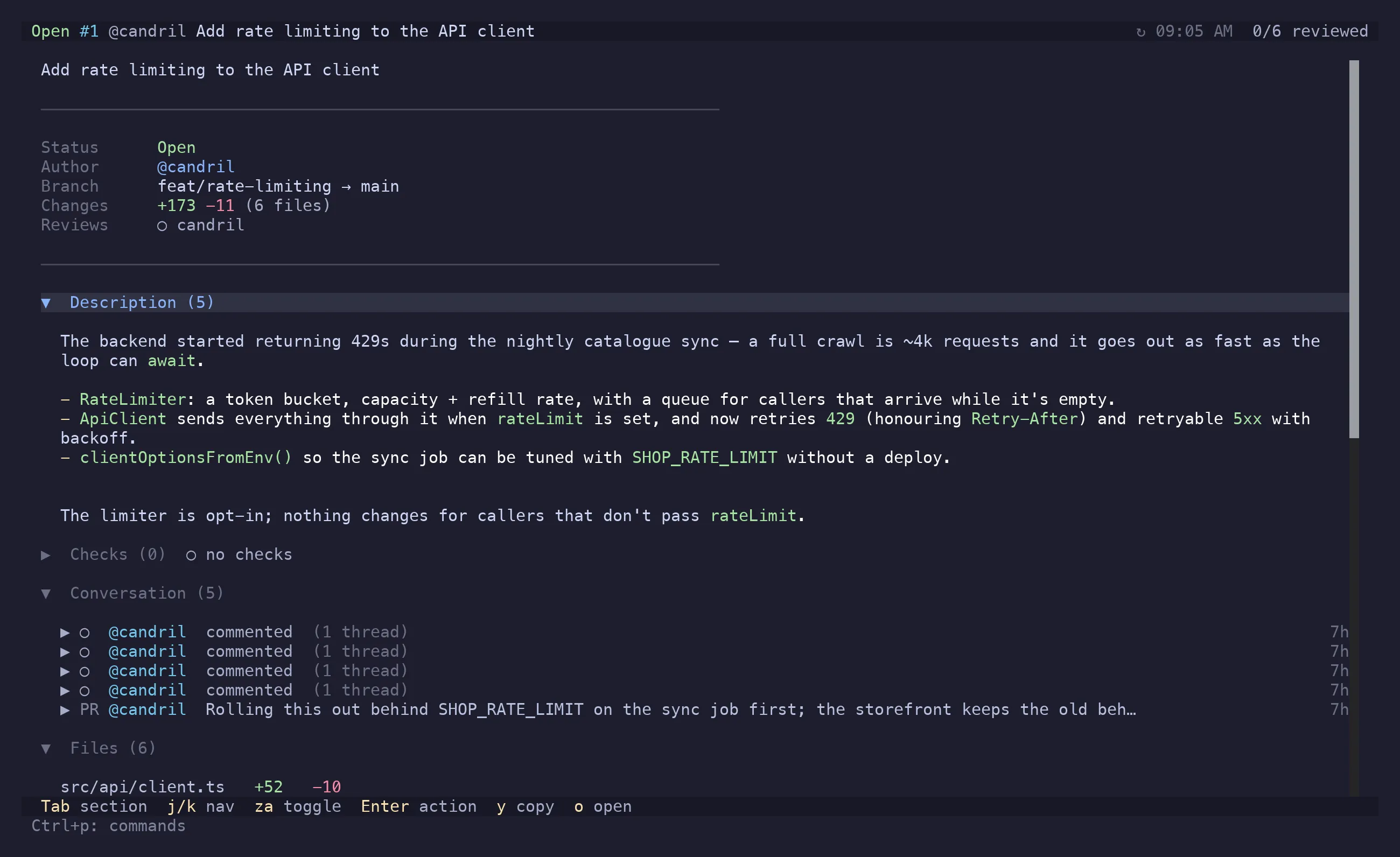
a opens it: one row per event, newest first — commits, comments, reviews, check runs, pushes
and force-pushes, merged by time. A comment whose thread has been resolved carries a ✓ and reads
dimmer; a comment new since your last visit carries a ●. It answers “what happened, and what happened
since I left” without the browser.
| Key | Action |
|---|---|
j / k |
Move |
c m r b t p |
Toggle a type: commits, comments, reviews, checks (builds), resolved comments, pushes |
u |
Only what you have not seen (the watermark) |
/ |
Filter the rows by text |
Esc |
Everything again — every type, seen or not, no text |
za |
Open a commit (▸) into the files it touched; j walks into them |
Enter |
Go to what the row is about — on a file of an open commit, that commit’s diff at that file |
s |
Label the rows and jump to one |
Enter is a way in, not a second comments panel: a commit opens the diff scoped to that commit,
a comment opens its thread, a check opens what it says. a comes back to the feed with the same
row still selected. A commit’s files are fetched when its row is opened, not on arrival, and the
timeline itself is read the first time you ask for the feed and again when you refresh.
The events come from GitHub’s timeline API — the only source that reports a force-push at all — merged with the checks and comments riff already has.
Commit filtering
Section titled “Commit filtering”]g narrows the diff to the first commit, ]g again to the second, and past the last one it
wraps back to the whole diff; [g goes the other way. Ctrl+g picks one out of a fuzzy list
instead. While the diff is one commit’s slice, the header says so — commit 2/5 · 7e8f200 … —
and Esc takes you back to the whole diff.
In the picker, j/k move, Space marks the commit under the cursor, and V marks a run from
there — moving drags its end along, V again keeps the run and lets the cursor leave it. Enter
scopes the diff to everything marked. Marked rows are coloured rather than badged, and reopening
the picker shows what is in scope with the cursor on the first of them. The list is read rather
than searched, so the letters belong to it: / is what asks for the filter.
A run of commits shows as one cumulative diff — from the oldest marked commit’s parent to the
newest — and the header reads commits 2–4/7. Commits with gaps between them have no such diff,
so riff shows their patches oldest first, a file two of them touched carrying both sets of hunks,
and the header reads 3 commits of 7.
Useful on a PR whose commits are actually a sequence of arguments rather than a pile of autosaves — and on the three changes that together moved the parser.
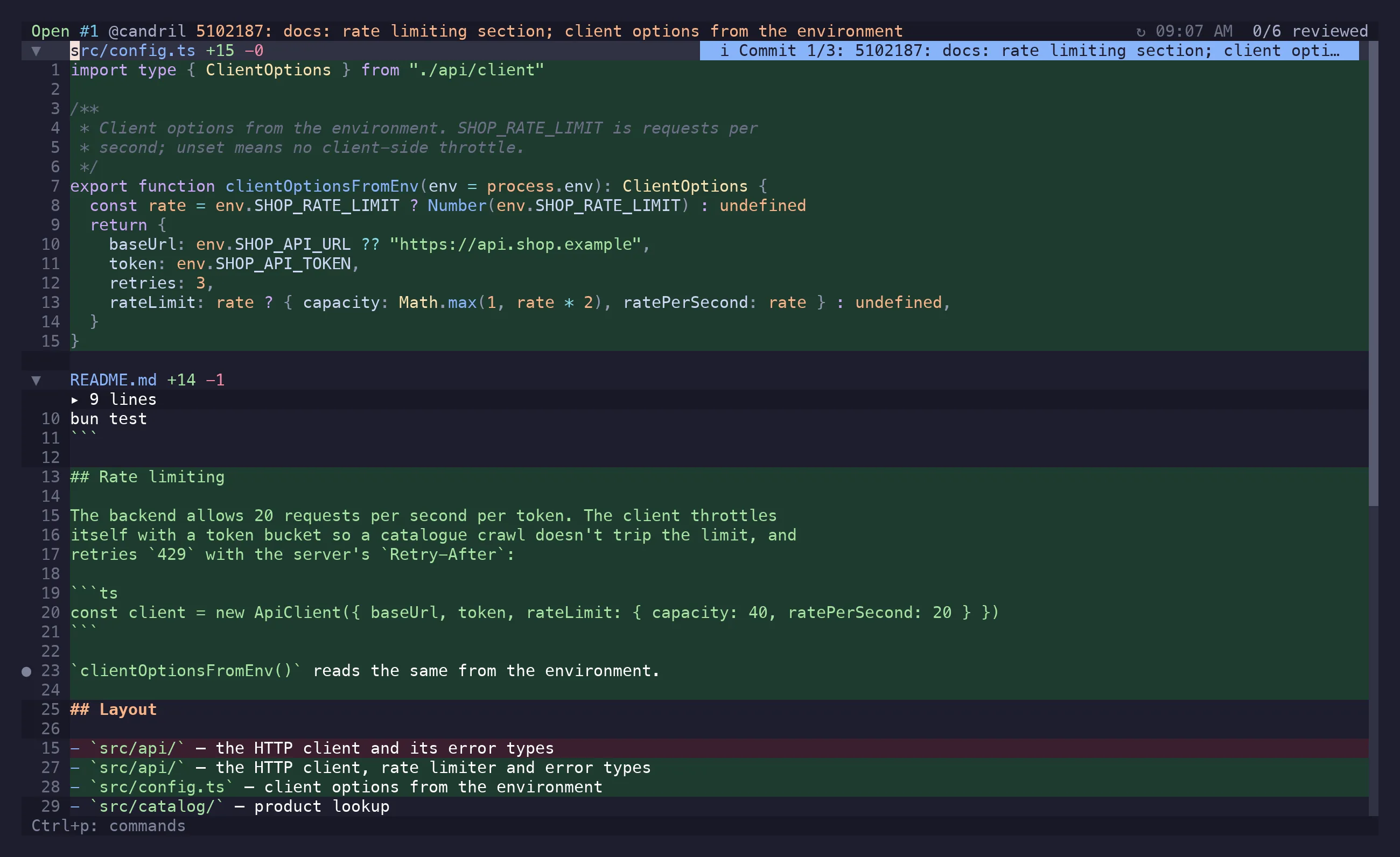
The PR your branch already has
Section titled “The PR your branch already has”Reviewing your working copy on a branch that already has a pull request, riff says which — the
header carries #1198 beside the branch, dimmed when it is closed or merged. Review PR #1198
in the action menu reopens riff on it in the same terminal, go opens it in a browser, and
Create Pull Request stops being offered, since there is one.
It stays two reviews, not one merged view: the PR’s diff has a different base and its own comment store, and a line that exists in your working copy but not on the branch has no honest place in a PR’s diff.
Action menu
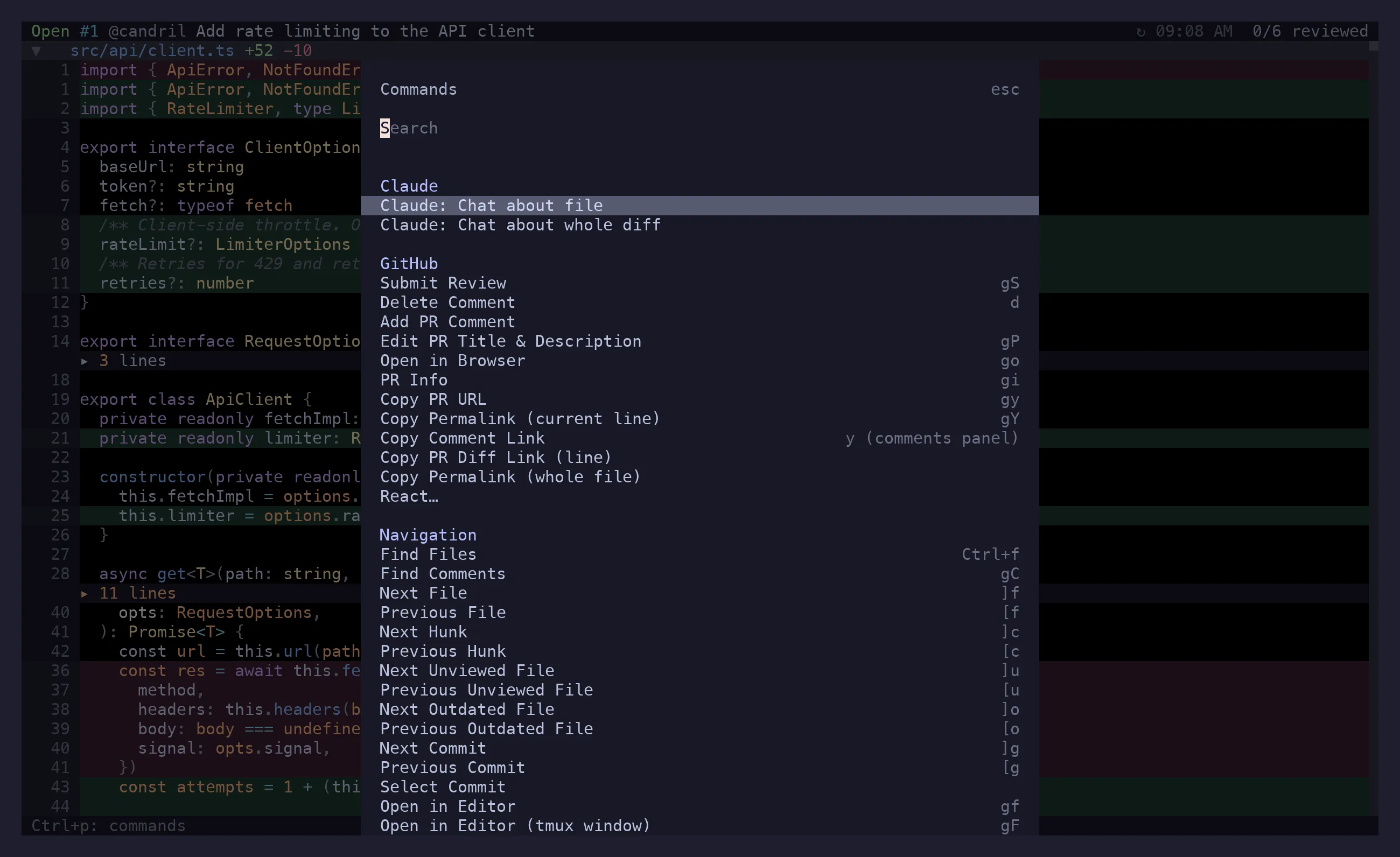
Section titled “Action menu”Ctrl+p. Type to filter, Enter to run. It only lists what applies right now: no
Submit Review on a local diff, no Open in Editor (tmux window) outside tmux, no
Copy drafted comment without a draft. It also carries the actions that have no key of their
own — creating a PR comment, viewing the file through difftastic, delta or nvim diff mode,
toggling hidden files, reactions, and the Claude Code handoffs.
Keymap overlay
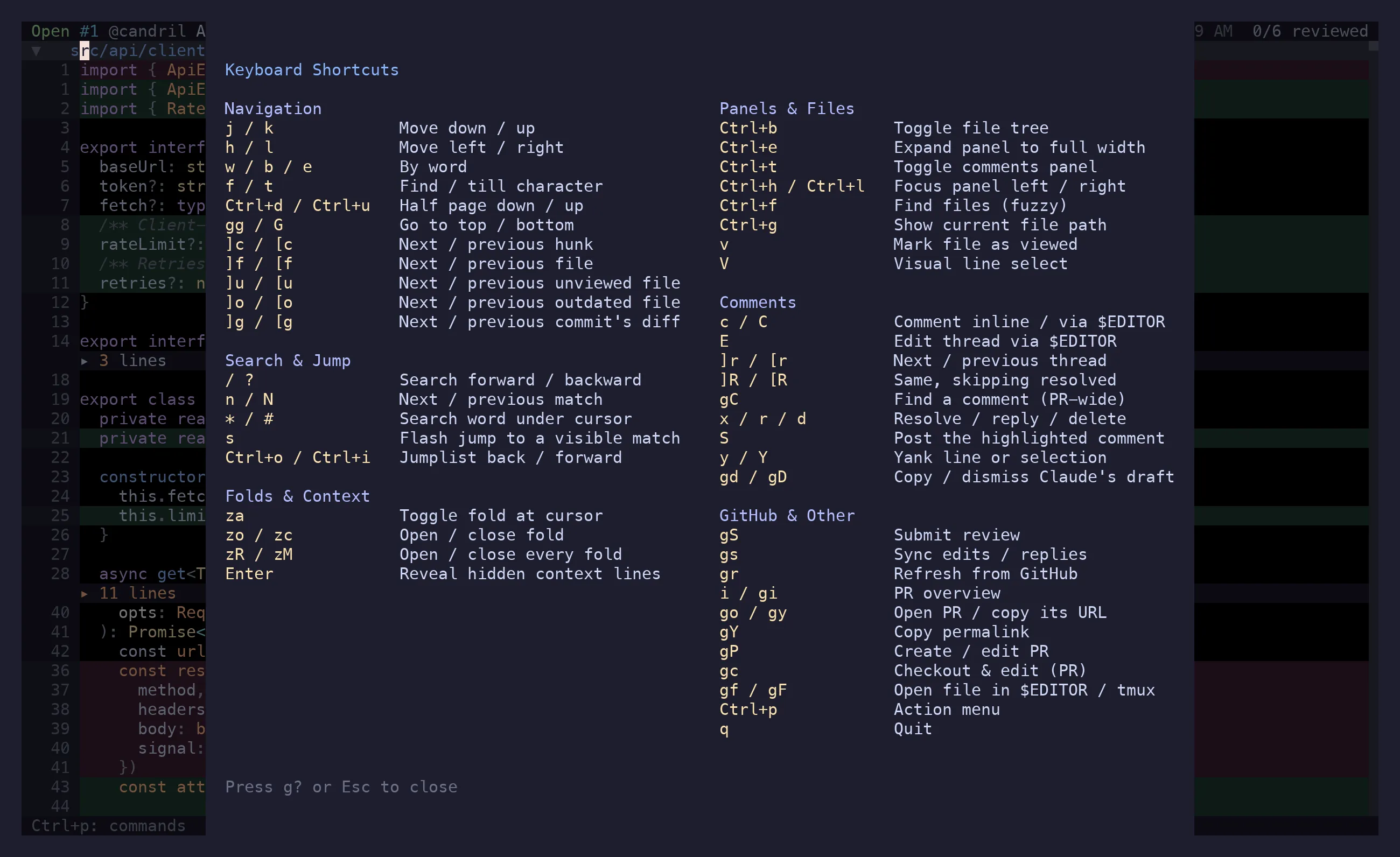
Section titled “Keymap overlay”g? draws the cheat sheet over whatever you were looking at — motions, jumps, folds, panels,
comments, GitHub — and g?, Esc or q puts it away. It works from every surface, the PR
overview and the comments panel included: the key you reach for when you are lost should not
depend on where you are lost. It’s the short version; the action menu is the exhaustive one.
Toasts and dialogs
Section titled “Toasts and dialogs”Transient messages — the copied path, the sync result, a failed API call — appear as a toast at
the bottom and clear with Esc. Destructive things ask first: y confirms, n or Esc
cancels.