
GitHub Workflow
riff has no GitHub credentials of its own. Every call shells out to the gh CLI,
so it acts as whatever account gh auth status reports and inherits that token’s scopes. If gh
can do it in your terminal, riff can; if it can’t, riff can’t either.
Opening a PR
Section titled “Opening a PR”riff pr # the PR for the current branch or bookmarkriff 123 # by number, in this reporiff gh:owner/repo#123 # from anywhereriff https://github.com/owner/repo/pull/123Startup is one GraphQL query: PR metadata, review threads, comments, commits, checks and viewed statuses in a single round trip, plus a REST call for the diff. On a cold start you wait once, not six times.
Before fetching, riff settles where comments will be stored — see storage — and asks for confirmation if it had to guess a local clone. The prompt comes before the fetch so you’re not answering it after a wait.
Publishing
Section titled “Publishing”Three separate gestures, because they mean three different things to the people watching the PR.
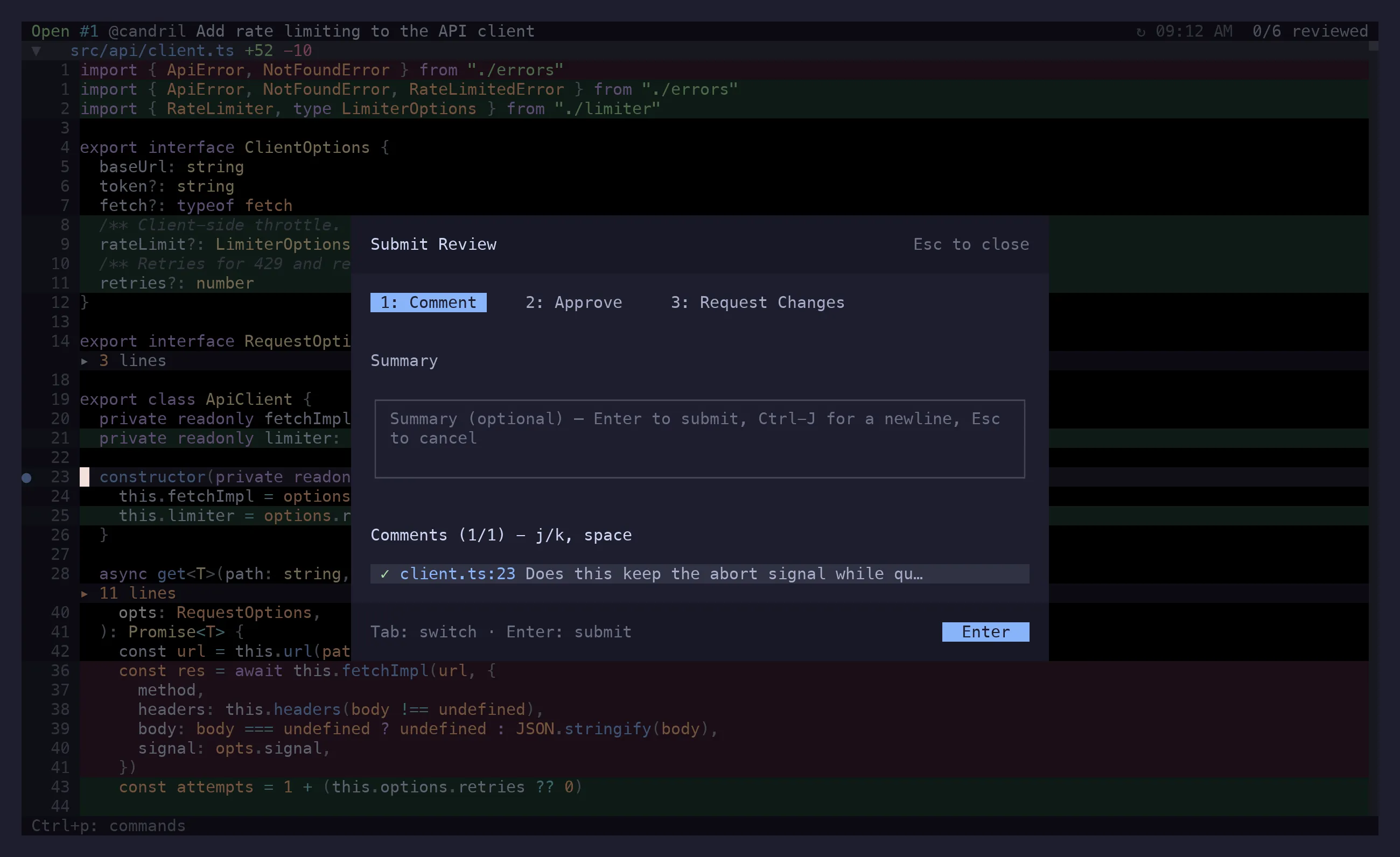
gS — submit a review
Section titled “gS — submit a review”Opens the review preview: your pending comments on one side, a summary box on the other.
| Key | |
|---|---|
1 2 3 |
Comment, approve, request changes |
Tab |
Move between the summary and the comment list |
j k |
Walk the comments |
space |
Exclude the highlighted comment from this review |
Enter / Ctrl+s |
Submit |
Esc |
Back out |
Everything included goes up as one review — one notification, one entry in the conversation. On your own PR, approve and request-changes are unavailable, because GitHub doesn’t allow them.
If GitHub already holds a pending review of yours (started in the web UI, or by a previous
partial submit), riff submits that one with your chosen verdict first, then posts the new
comments as a follow-up review. A stranded pending review is also the reason single-comment
posting sometimes fails with user_id can only have one pending review per pull request —
submitting or discarding it clears the jam.
gs — sync changes
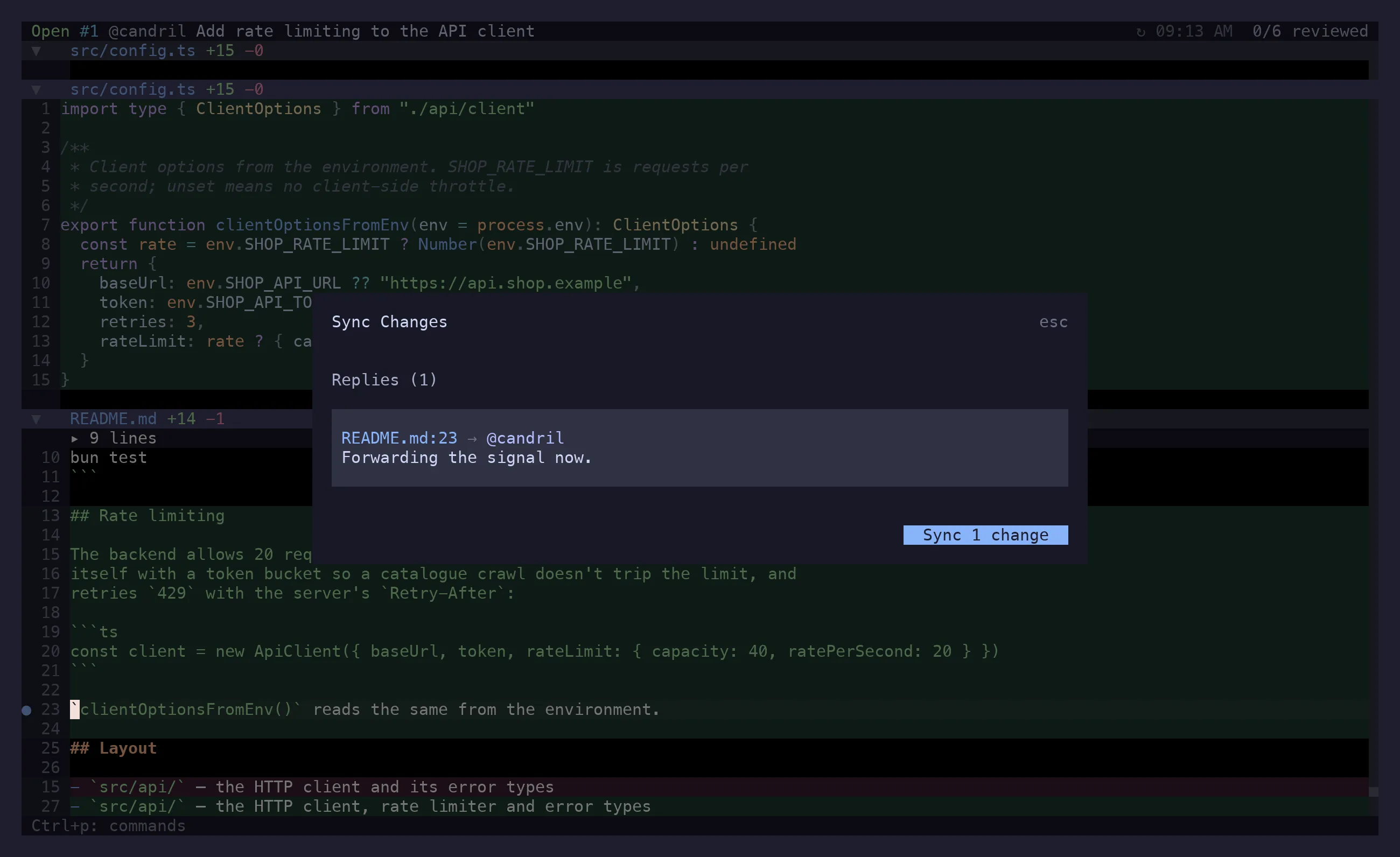
Section titled “gs — sync changes”The maintenance pass, with no review event attached:
- edits to comments you’d already posted,
- replies to existing threads,
- thread resolutions.
gs opens a preview of exactly what will be sent; Enter confirms, Esc cancels.
Post one comment now
Section titled “Post one comment now”Ctrl+p while writing, or S on a comment in the panel. Posts that single comment straight away.
Useful for a question you want answered before you’ve finished reading; not the way to deliver a
review.
Other PR actions
Section titled “Other PR actions”| Key | Action |
|---|---|
gr |
Refresh — diff, commits, comments, checks, the feed |
gi / i |
PR overview |
a / d |
The feed / the diff |
go |
Open the PR in a browser |
gy |
Copy the PR URL |
gY |
Copy a permalink to the selection, the line, or the file |
gP |
Edit the PR title and body in $EDITOR |
gc |
Check out the PR branch, then open the current file in $EDITOR |
Copy PR Diff Link in the action menu is the other kind of link: it points at the change in the PR’s Files-changed tab rather than at the blob. Permalinks pin to the branch, so they survive a force-push differently than a line link does — pick the one whose failure mode you want.
Creating a PR
Section titled “Creating a PR”In local mode, gP creates one. riff opens $EDITOR on a git-commit-verbose-style template:
title on the first line, body under it, a # Draft: no toggle, then a scissors line with the
branch, the file summary and the whole diff below it as context you can read while you write.
Everything under the scissors is dropped, the rest goes to gh pr create, and the session
switches itself over to reviewing the PR it just made.
gP in PR mode edits the existing title and body through the same template.
Whose move is it
Section titled “Whose move is it”The header’s right side starts with a verdict on the PR: ✓ mergeable, or who is holding it —
! conflicts, ! behind main, ! changes requested, ! checks failing, ! 2 open threads for
the author; ? needs review, ? blocked for someone else; · checks running, · waiting for GitHub for a machine; ⇢ auto-merge (squash) and ◌ draft for nobody. The glyphs are the ones
presto uses, so a reader of both sees one thing.
An open comment thread outranks whatever GitHub says: this is a team that blocks by commenting rather than by requesting changes, so an unresolved thread is the author’s move even while GitHub reports the PR as merely awaiting review. A draft gets no verdict at all — branch protection is not evaluated for drafts, and what GitHub reports about one cannot be trusted.
Stacked PRs
Section titled “Stacked PRs”When the base branch is itself an open PR’s head, the overview’s metadata block says so —
stacked on #1217 OSA-62316 import the Swiss address register — and, when that base has moved
since this PR branched, which way: moved on by N commits (the base grew; the diff is still
right) or rewritten since you branched — rebase (the base was force-pushed, so this PR’s diff
now carries the base’s changes as if they were its own; GitHub says DIRTY, the header says
! conflicts, and the fix is a rebase onto the base’s current head). A rewritten base is worth a
toast on opening, because it changes what the diff means. Three REST calls, after the first
render, and only the first of them for a PR that turns out not to be stacked.
Viewed status
Section titled “Viewed status”v writes GitHub’s own viewed checkbox, and riff reads it at startup. Marking a file viewed in
riff shows up in the web UI, and the other way round after a gr. riff additionally records the
commit you viewed it at, which GitHub does not, so it can tell you a file changed after you
signed it off — ]o/[o walks those.
Background polling
Section titled “Background polling”New replies land without you asking. The poll costs one GraphQL point per tick, defaults to five minutes, skips ticks while the terminal is unfocused and refreshes when focus comes back:
[poll]interval = 300 # seconds; 0 disables itonFocus = truegr refreshes on demand regardless. In local mode there is nothing to poll, but onFocus still
re-reads the diff and .riff/ when the terminal regains focus — which is what makes a Claude
session retiring comments through riff comments show up without a keypress.
A refresh changes the data and nothing else: the view you were in, the file you had open, your folds, your search and the line you were reading all come back. When the line itself is gone — deleted, or carried off by a force-push — riff lands on the nearest one in that file and says so.
Since your last visit
Section titled “Since your last visit”riff remembers, per PR, when you last had it open and what had been read by then. What arrived
since is marked: a dot on the file in the tree, on the thread in the comments panel, and ]n /
[n walk the unread comments across files the way ]r / [r walk threads. A ▴ marks a file
whose content moved since that visit.
A comment counts as read once it has been on screen — in the comments panel, or in an open Conversation section. Opening the PR does not mark everything read, and the marks stay put for the whole session: reading takes effect at your next visit, which is the question this answers. The mark itself is written when riff exits and when you refresh, never continuously.
When the branch was rewritten since that visit, riff says rebased and falls back to times
rather than claiming that forty files changed. Nothing here is sent to GitHub — it is riff’s own
memory of your reading, kept in .riff/ beside the viewed statuses.
API budget
Section titled “API budget”Worth knowing if you keep several riff panes open: GitHub meters GraphQL in points, not
requests — 5000 an hour, on a quota separate from REST’s 5000 — and it prices a query by its
nested node count. The feed’s timeline is REST rather than GraphQL, so it spends from the other budget, and only
when you open the feed. riff’s measured costs are 51 points for a full thread fetch, 2 for a
probe-depth one, 1 for the poll’s thread-state check, 2 for metadata reactions, 1 for viewed
statuses. Note that gh pr view --json … is GraphQL too, not REST.
Repositories you’re not standing in
Section titled “Repositories you’re not standing in”riff gh:owner/repo#123 works from anywhere. riff resolves a local clone for comment storage in
this order: an explicit storage.repos mapping, the
current directory if it happens to be that repo, then a search under storage.basePath — which
it confirms with you before using. Failing all that, comments go to ~/.riff/.
Only comment storage needs the clone. The diff itself comes from GitHub.