
Key Bindings
Keys are contextual: the same letter means different things in the diff, in the comments panel and in the PR overview. Each table below is one surface.
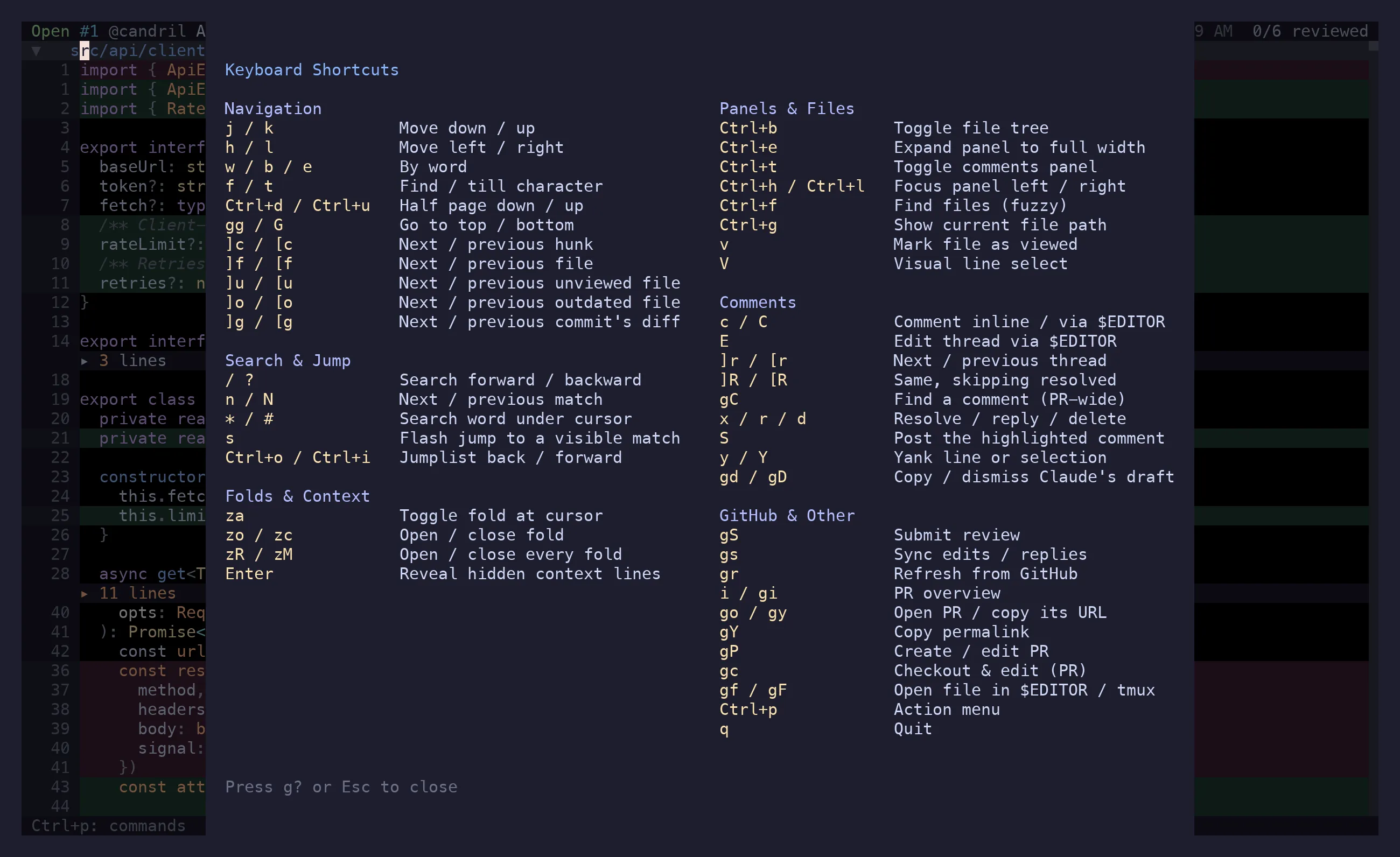
g? opens the keymap overlay — this page, condensed, without leaving the app. Ctrl+p opens the
action menu, which is the authoritative list: it shows only what applies to the state you’re in,
with the shortcut next to it. Bindings are not configurable yet.
Motions
Section titled “Motions”In the diff. These follow vim, including the ones you only notice when they’re missing.
| Key | Action |
|---|---|
j k |
Down, up (arrow keys too) |
h l |
Left, right |
w e b |
Word forward, end of word, word back |
0 ^ $ |
Line start, first non-blank, line end |
f{char} t{char} |
Find character forward, till character |
; , |
Repeat that find, forward and back |
Ctrl+d Ctrl+u |
Half page down, up |
gg G |
Top, bottom of the diff |
V |
Visual line mode — select a range for a comment or a yank |
Esc |
Leave visual mode, or clear search highlights |
Long lines
Section titled “Long lines”The diff scrolls sideways rather than wrapping, and moving the cursor carries the view with it. These are for moving the view on its own.
| Key | Action |
|---|---|
zl zh |
Scroll one column right, left |
zL zH |
Scroll half a screen right, left |
zs ze |
Put the cursor’s column at the left, right edge |
gl |
Peek the line in full — or, in a markdown table, the table as a grid |
zw |
Toggle soft wrap for the whole diff |
Jumping
Section titled “Jumping”| Key | Action |
|---|---|
]c [c |
Next, previous hunk |
]f [f |
Next, previous file |
]u [u |
Next, previous unviewed file |
]o [o |
Next, previous outdated file — viewed, but changed since |
]r [r |
Next, previous comment thread |
]n [n |
Next, previous comment you have not seen |
]R [R |
Same, skipping resolved threads |
]g [g |
Next, previous commit’s diff; wraps back to the full diff |
s |
Flash jump — search what’s on screen, press a label to land (file headers included) |
Ctrl+o Ctrl+i |
Jumplist back, forward (Tab is forward too) |
Every one of these records a jumplist entry, so Ctrl+o undoes it.
Search
Section titled “Search”| Key | Action |
|---|---|
/ ? |
Search forward, backward |
n N |
Next, previous match |
* # |
Search the word under the cursor, forward and backward |
Esc |
Clear the highlights |
| Key | Action |
|---|---|
za |
Toggle the fold at the cursor — file header, hunk, or fenced code block |
zA |
Fold or unfold every fenced code block in this file |
zo zc |
Open, close it |
zR zr |
Open every fold |
zM zm |
Close every fold |
Enter |
On a context divider: reveal the hidden unchanged lines |
Expanded context lines are for reading only — GitHub can’t anchor a comment outside a hunk.
Files and panels
Section titled “Files and panels”| Key | Action |
|---|---|
Ctrl+b |
Toggle the file tree |
Ctrl+e |
Toggle the file tree — or the comments panel, when it has focus — to full width |
Ctrl+h |
Move focus left: comments → diff → tree |
Ctrl+l |
Move focus right: tree → diff → comments |
Ctrl+t |
Toggle the comments panel |
Ctrl+f |
Fuzzy file picker, from every view |
/ |
Filter the list that has focus — tree, PR overview, feed, comments panel; search, in the diff |
Ctrl+g |
Pick commits to scope the diff to — Space marks, V marks a run (Esc in the diff leaves it) |
v |
Mark the file viewed and advance to the next unviewed |
Esc |
Leave single-file view — after clearing a selection or search highlights |
In the file tree: j/k moves, l/Enter opens a file or expands a folder, h collapses,
v toggles viewed, / filters by path, Esc hands focus back to the diff.
Filtering: / opens an input in the panel header, typing narrows the tree live (loosely, against
the whole path — apicl finds src/api/client.ts), Enter keeps the filter and returns to
navigating it, Esc drops it. It’s a real text field, so Ctrl+w, word jumps, paste and undo all
work.
Backspace (the same key as Ctrl+h) walks focus left first, so coming back to the tree keeps
the filter; once there is nowhere left to move it clears an applied filter. Esc in the tree
clears it too, after any multi-select and before leaving the panel.
Comments
Section titled “Comments”From the diff:
| Key | Action |
|---|---|
c |
Comment on the cursor’s line, or on the visual-line selection |
C |
The same, drafted in $EDITOR |
E |
Edit the thread on this line in $EDITOR |
Enter |
Open the thread on this line in the comments panel |
gC |
Fuzzy picker over every comment in the PR |
In the comments panel (focused — Ctrl+t, or Enter on a thread):
| Key | Action |
|---|---|
j k |
Move between comments |
J K |
Jump to the next, previous thread |
Ctrl+d Ctrl+u |
Half a screen of comments |
za / Enter |
Expand or collapse the highlighted thread |
n |
New thread at the diff cursor’s line |
s |
Flash — label every visible comment, next key jumps |
g? |
The keymap |
gx gX |
Pick from every link in the panel’s comments — open it, or copy it |
r R |
Reply inline, reply in $EDITOR |
e E |
Edit inline, edit in $EDITOR |
d |
Delete the highlighted comment |
x |
Toggle the thread resolved |
S |
Post this one comment now |
y |
Copy a link to it |
o |
Open its file at its line in $EDITOR |
q Esc Ctrl+h |
Close the panel, or hand focus back |
While writing a comment:
| Key | Action |
|---|---|
Enter / Ctrl+s |
Save locally |
Ctrl+p |
Save and post it to GitHub now |
Ctrl+j |
Newline |
Ctrl+g |
Continue in $EDITOR |
Ctrl+y |
Insert a suggestion block for the lines the comment replaces |
@ |
Mention picker — ↑/↓ or Ctrl+p/Ctrl+n, Tab/Enter accepts |
: |
Emoji picker, same keys — :roc → 🚀 |
Esc |
Cancel |
Ctrl+Enter also posts, in the terminals that can send it. Ctrl+p is the one that works
everywhere, tmux included. In local mode both just save — there’s nothing to post to.
GitHub
Section titled “GitHub”| Key | Action |
|---|---|
gS |
Submit review — opens the preview |
gs |
Sync edits, replies and resolutions |
gr |
Refresh diff, commits and comments |
gi |
PR overview panel |
i / a / d |
PR state / feed / diff — the same key again goes back |
c m r b t p u |
In the feed: toggle a type, unseen only; Esc puts everything back |
za |
In the feed: open a commit into its files |
go |
Open the PR in a browser |
gy |
Copy the PR URL |
gY |
Copy a permalink to the selection, line, or file |
gP |
Edit the PR title and body — or create a PR, in local mode |
gc |
Check out the PR branch and open the file in $EDITOR |
In the review preview (gS): 1 2 3 pick comment / approve / request changes, Tab
switches between the summary box and the comment list, j/k walks it, space excludes a
comment from this review, Enter or Ctrl+s submits, Esc backs out. The sync preview
(gs) is simpler: Enter confirms, Esc cancels.
PR overview
Section titled “PR overview”i or gi gets you here. Sections are description, conversation, checks, approvals, commits and
files.
| Key | Action |
|---|---|
j k |
Move |
l h |
Expand, collapse the selected item |
za |
Fold the section, thread, or check under the cursor |
zr zR / zm zM |
Expand, collapse one section or all of them |
c |
Write a conversation comment |
x |
Toggle the focused review thread resolved |
Enter |
Context-dependent: open a check’s annotation in $EDITOR, expand a failing check, or open the item in a browser |
y |
Copy a link to the focused item |
gg |
Top |
g? |
The keymap |
gx gX |
Pick from every link in the overview — open it, or copy it |
gr go gy |
Refresh, open in browser, copy PR URL — as everywhere |
s |
Flash — label every row, next key jumps |
q Esc Tab i |
Back to the diff |
Editor and clipboard
Section titled “Editor and clipboard”| Key | Action |
|---|---|
gx gX |
Follow the link under the cursor in the browser, or copy it |
gf |
Open the current file in $EDITOR at the cursor’s line |
gF |
The same, in a new tmux window, with riff still running |
y |
Yank the line or selection, without the +/- gutter |
Y |
Yank it with the gutter intact |
gd gD |
Diff this file’s two versions in $EDITOR, in a tmux pane |
Pickers and menus
Section titled “Pickers and menus”Every fuzzy picker — files, comments (gC), commits, the action menu (Ctrl+p) — takes the same
keys: type to filter, ↑/↓ or Ctrl+p/Ctrl+n to move, Enter to choose, Esc to cancel.
They all type into the same input widget, so Ctrl+w deletes a word, Ctrl+u the line, and
word motions, paste, undo and selection work in every one of them — the filter prompts included.
Global
Section titled “Global”| Key | Action |
|---|---|
Ctrl+p |
Action menu |
g? |
Keymap overlay (Esc or q closes) |
Ctrl+o |
Jump back |
q |
Quit |
y / n |
Answer a confirmation dialog |
Chords (g, z, ], [) time out after half a second, so a g you didn’t mean to press
costs nothing.