Key Bindings
lane is vim-flavoured: lowercase moves the cursor, uppercase moves the thing under it, and
chords (v, g, t, z, f, ⇧T) group related actions behind a prefix.
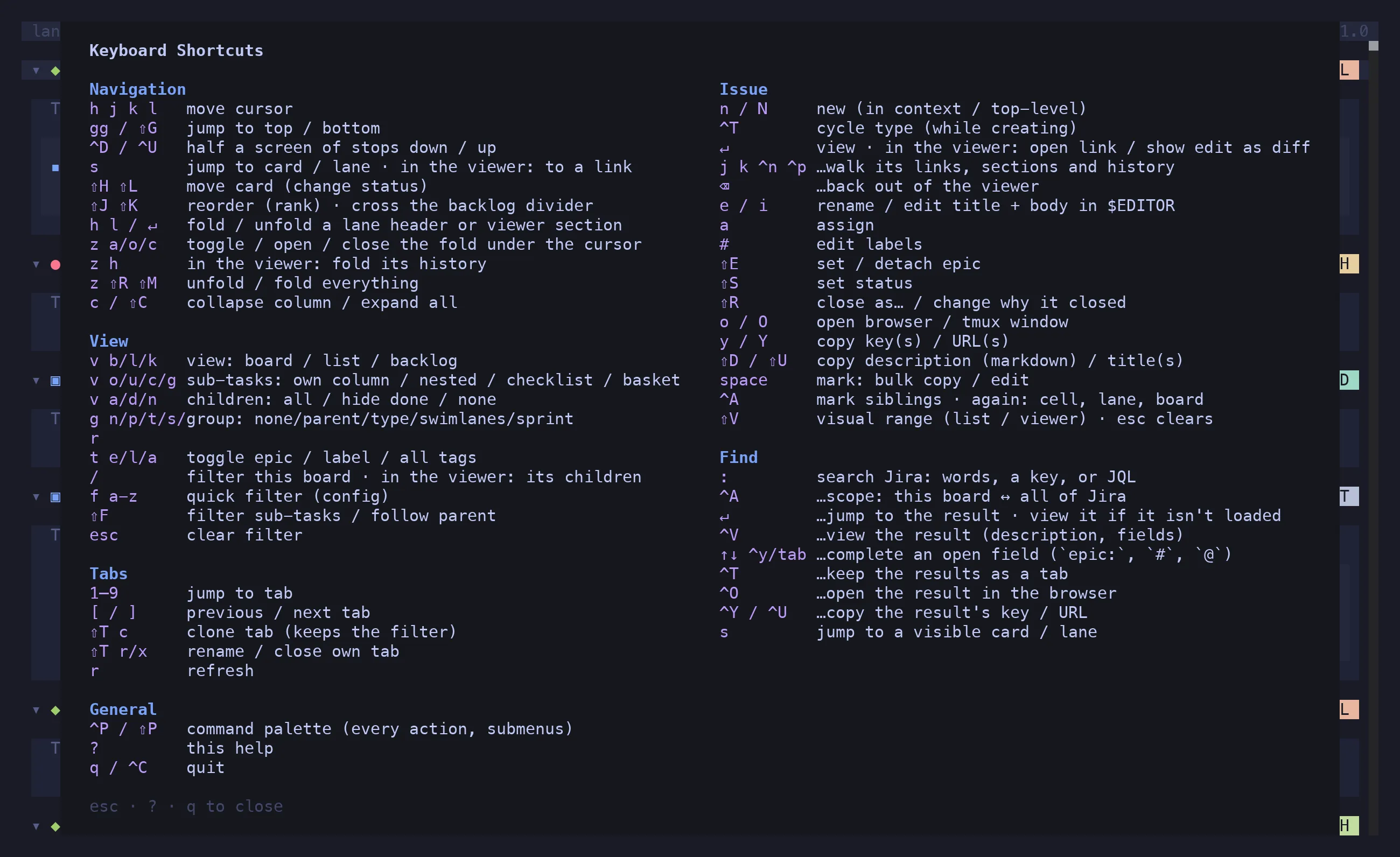
Press ? at any time for this list in the app. esc, ? or q closes it.
Navigation
Section titled “Navigation”| Keys | Action |
|---|---|
h j k l |
move the cursor |
gg / ⇧G |
jump to top / bottom (in the viewer: first / last item) |
^D / ^U |
half a screen of stops down / up |
s |
jump to a card or lane — labels appear, type one; on a dense board, type to narrow first; in the viewer: to a link |
⇧H ⇧L |
move the card — or every marked one — to the previous / next column (a status transition) |
⇧J ⇧K |
reorder (rank) — the marked block moves as one; crosses the backlog divider |
h l / ↵ |
on a lane header or a viewer section: fold / unfold |
z a / z o / z c |
toggle / open / close the fold under the cursor: sub-tasks, a lane, a row, a viewer list |
z h |
in the viewer: fold / unfold its history |
z ⇧R / z ⇧M |
unfold / fold everything |
c / ⇧C |
collapse the column under the cursor / expand all |
The cursor addresses cells, not cards: an empty cell is a valid position, so h j k l
always moves exactly one step instead of skipping across gaps.
| Keys | Action |
|---|---|
v b / v l / v k |
view: board / list / backlog |
v o / v u / v c / v g |
sub-tasks: own column / under the parent / checklist / baskets |
v a / v d / v n |
children: all / hide the done ones / none |
g n / g p / g t / g s / g r |
group: none / parent / type / swimlanes / sprint |
t e / t l / t a |
toggle epic tags / label tags / all tags on cards |
/ |
filter this board; in the viewer: its children |
f a–z |
apply a quick filter from [filters] |
⇧F |
filter sub-tasks strictly, or let them follow their parent |
esc |
clear the filter |
View, grouping, layout, filter and tag visibility are per tab, and are restored on the next launch.
| Keys | Action |
|---|---|
↵ |
view the issue; in the viewer: open the selected link, or show a text edit as a diff |
j k / ^N |
in the viewer: walk its links, sections and history |
⌫ |
back out of the viewer |
n / ⇧N |
new issue, in the cursor’s context / top-level |
^T |
cycle the issue type — while the create prompt is open |
u |
undo the last create — asks first (y deletes, n keeps) |
↵ |
on the create notice: open the new issue in the viewer |
e |
rename |
i |
edit title and body in $EDITOR |
a |
assign |
# |
edit labels |
⇧E |
set or detach the epic |
⇧S |
set status from a picker of the board’s statuses |
⇧R |
close as a reason, or change why a closed issue closed |
o / ⇧O |
open in the browser / in a tmux window |
y / ⇧Y |
copy the issue key / URL |
⇧D / ⇧U |
copy the description as Markdown / the title |
Every mutation is optimistic — the board updates at once and reverts if Jira refuses.
Selection
Section titled “Selection”| Keys | Action |
|---|---|
space |
mark the issue under the cursor |
^A |
mark its siblings; again: the cell, the lane, the board |
⇧V |
visual range, in the list and the viewer — again ends it, keeping the selection |
esc |
clear the selection |
With a selection, ⇧S, a, #, ⇧E, ⇧R, ⇧H / ⇧L and the copy keys act on every marked
issue.
| Keys | Action |
|---|---|
: |
search Jira: words, a key, or JQL |
^A |
…toggle scope: this board ↔ all of Jira |
↑ ↓ ^Y tab |
…complete an open field (epic:, #, @) |
↵ |
…open the result (description, fields) |
^T |
…keep the results as a tab |
^O |
…open the result in the browser |
^Y / ^U |
…copy the result’s key / URL |
s |
jump to a card or lane that’s already visible — narrowing by text when there are many |
s labels what you can point at. Up to 25 targets it labels them all and one keystroke lands.
Past that it opens a jump ▸ prompt: type a word from a card’s key or summary, and each
remaining match keeps a single-key label. The board fades while you type, and every match steps
back out of the fade with the typed text picked out inside it. A key that could extend what you
typed is never used as a label, so every keystroke either narrows or lands. Backspace takes a
character back, esc cancels.
/ and : speak the same grammar — see Filtering & Search.
| Keys | Action |
|---|---|
1–9 |
jump to a tab |
[ / ] |
previous / next tab |
⇧T c |
clone this tab, keeping its filter |
⇧T r / ⇧T x |
rename / close a tab you made |
r |
refresh |
⇧T r and ⇧T x only act on tabs you created; config-defined boards can’t be renamed or closed
from inside the app. Yours are tinted in the tab bar so you can tell which is which.
General
Section titled “General”| Keys | Action |
|---|---|
^P / ⇧P |
command palette |
? |
this help |
q / ^C |
quit |